Contents
- What is cloud accounting?
- Signs it is time to move to cloud accounting
- How to choose the right cloud accounting setup
- How to switch accounting software safely
- What does accountant-led setup actually include?
- The real payoff: knowing where you stand
- How N-Accounting can help
- Frequently asked questions
Nobody wakes up wanting to change their accounting software. You get pushed into it, usually because the way you have always done things has quietly stopped keeping up.
Maybe the paperwork is piling up faster than anyone deals with it. Maybe you cannot say how much cash you will have next month without working it out by hand. Maybe you are typing the same figures into a spreadsheet and then again into something else, or the software you started with just does not fit anymore. Whatever the trigger, the question is the same: is it time to move to cloud accounting, and if so, how do you do it without creating a mess?
This is a practical guide to exactly that. Here is the bit most people get wrong: choosing the software is the easy part. The setup, the processes and the person who keeps it up to date matter far more than which logo is on the login screen. The best software in the world will not save you if nobody reconciles the bank. Get that straight and the rest gets easier.
What is cloud accounting?
Cloud accounting is software you use online, through a browser or an app, instead of a program bolted to one computer in the office. Your records sit securely on the provider’s servers, so you, your team and your accountant can all work from the same live information at once, wherever you are.
The magic is not the internet part, it is what the connection lets the software do for you. It links straight to your bank account and pulls transactions in on its own. It raises and chases invoices. It captures receipts from your phone. It produces reports the moment you want them. In short, it does the boring, repetitive work you used to do by hand, and keeps it all in one place.
This is where people get confused, so let us be blunt. A spreadsheet in an online folder is not cloud accounting. That is just a spreadsheet you can open from two computers: no bank feed, no live reporting, no connection to HMRC and nobody doing the work but you. Cloud accounting is a system that works for you. A spreadsheet in the cloud is just a file that lives somewhere you can reach it.
Signs it is time to move to cloud accounting
You will rarely need telling the moment has come. The signs turn up in the day to day, and they are hard to ignore once you know to look:
- Your records only get touched now and then, usually in a panic before a deadline, rather than kept up to date as you go.
- Reconciling the bank is a manual chore that keeps getting put off, which means you are never totally sure the numbers are right.
- You cannot easily say who owes you money, what is still outstanding or where half the receipts have got to.
- Working with your accountant means emailing files back and forth and hoping you are both looking at the same version.
- VAT, reporting, or just the business getting bigger, has piled on complexity your current setup was never built to cope with.
Here is the reassuring bit: none of this means you have done anything wrong. It almost always just means the business has grown up a bit and its plumbing needs to catch up. Normal, and fixable.
How to choose the right cloud accounting setup
The instinct is to jump straight to comparing products. Resist it. The software is the last thing you decide, not the first. Start with your own business and the right system tends to pick itself.
Start with your process, not the product list
Map how money actually moves through your business right now: how you win the work, raise the invoice, get paid, pay suppliers and staff, and record all of it. You want software that fits the way you already work, not something that makes you bend your business around it. Once you can see the process clearly, the list of what you need almost writes itself.
Be honest about volume, users and bookkeeping
A dozen invoices a month is a different animal to hundreds of transactions across several accounts. Be honest about how much you actually do, how many people need access, and what each of them needs to do. A sole trader and a growing company with a team do not need the same thing. Paying for capability you will never touch is as much a mistake as picking something you outgrow by the summer.
Check the features that actually matter to you
Write down what you genuinely need and ignore the rest of the feature list. A reliable feed from your actual bank. Invoicing that looks the part and chases itself so you do not have to. Easy receipt capture from your phone. And the reports you need to run the business day to day, not just the ones the accountant needs in January. Match your shortlist to that, not to whoever boasts the most features on their homepage.
Sort out VAT and Making Tax Digital
If you are VAT registered, this is not optional. Your software has to keep digital records and file your VAT returns under Making Tax Digital, which every VAT registered business has had to do since April 2022. Making Tax Digital for Income Tax has now landed too. From 6 April 2026 it applies to sole traders and landlords with qualifying income over 50,000 pounds, then 30,000 pounds from April 2027 and 20,000 pounds from April 2028. Whatever you pick has to be on HMRC’s list of recognised software and cover the obligations that apply to you. Not sure which do? Ask us and we will check rather than leave you guessing.
Decide who is actually going to keep it up to date
This is the question nearly everyone skips, and it matters more than any feature comparison. Good software takes away most of the donkey work, but somebody still has to run it: reconcile the bank, check the coding, chase the late payers. Be honest about whether that is you, someone on your team, or your accountant. The answer shapes the right choice more than any shiny feature will, because a brilliant platform nobody maintains is worse than a simple one somebody does.
On the software itself, we sit on the fence on purpose. Xero and QuickBooks are two of the most popular options and both are genuinely good. Anyone who tells you one is simply the best, full stop, is selling something. The right answer depends on your business, not a league table, and helping you work out which fits is part of the job.
How to switch accounting software safely
A migration sounds like a nightmare and really does not have to be, as long as it is planned instead of rushed. For most small businesses it takes somewhere between two and four weeks, and it follows the same five stages every time.
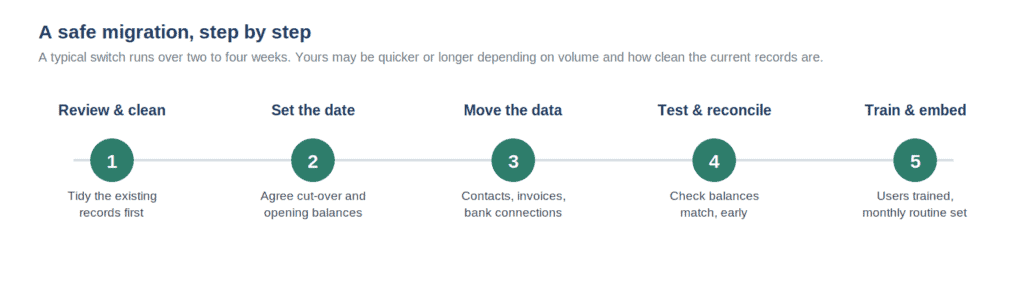
1. Review and clean the existing records
Do not drag your mess across with you. Before anything moves, get the current records up to date, reconcile what you can and throw out the duplicates and errors. Clean data moves over easily. A mess just gets recreated in a nicer looking system, and now you are paying a monthly fee for it.
2. Agree the migration date and opening balances
Pick a sensible line in the sand, usually the start of a VAT quarter, month or financial year, and agree the opening balances the new system starts from. Draw that line clearly and everything after it is easier to check.
3. Move the data, contacts, invoices and bank feeds
Bring across your customer and supplier details, any outstanding invoices and whatever history you want to keep, then connect the bank feeds so transactions start dropping in on their own. Most platforms give you tools to help, and it is the stage where having an accountant do it saves the most time and worry.
4. Test it and reconcile early
Do not assume it works, check it. Make sure the opening balances are right, the bank feed is pulling through properly and a test invoice behaves. Reconciling in those first few weeks catches teething problems while they are small and quick to sort, rather than nine months later when they are not.
5. Train people and set a monthly routine
A system is only as good as the habits around it. Make sure everyone who touches it knows their bit, and put a simple monthly routine in place so records stay current from day one instead of sliding back into the old catch up habit you were trying to escape.
What does accountant-led setup actually include?
You can do this yourself, and plenty of people do. Bringing an accountant in tends to make it faster, safer and set up properly from the off. What it covers depends on your business and software, but as a rule it means:
- Helping you pick a system that genuinely fits, not the one with the cleverest advert.
- Planning the migration properly, including the timing, the opening balances and what to bring across.
- Configuring the software and giving the chart of accounts a proper once over, so your reports mean something from the start.
- Getting the bank feeds and any integrations you need up and running.
- Walking you through the day to day and handing over cleanly, so you are confident actually using it.
The aim is not to take the software off you and keep it a mystery. It is to get it set up right once, so it works properly for years instead of being quietly worked around because nobody configured it correctly in the first place.
The real payoff: knowing where you stand
The genuine benefit of all this is not the software. It is what clean, current records let you see. Once the bookkeeping is up to date and reconciled, everything downstream gets easier and a lot more trustworthy.
You can see your cash position and what is coming in and going out, instead of crossing your fingers. Proper management reporting becomes possible, because the numbers underneath it can be trusted. And VAT and tax stop being a last minute scramble, because the records are already in order when the deadline turns up. Cloud accounting done well is the foundation everything else in your finances sits on. It turns bookkeeping from a chore you dread into information you can actually run the business with.
How N-Accounting can help
We meet businesses wherever they are: choosing the right system, planning and running the migration, setting it up so it actually works, then keeping the bookkeeping rhythm going so it keeps earning its keep. Want us to handle the whole switch? We will. Just want us to set you up to run it yourself? We will do that too. Whatever suits you.
Either way you end up with a system that fits, records you can trust and a clear view of where you stand, without the switch turning into the headache everyone assumes it will be.
Thinking about moving to cloud accounting? Book a call to talk through Xero cloud accounting with us. We will look at where you are now and work out the simplest way to get you onto a system that fits.
Frequently asked questions
What is cloud accounting?
Accounting software you use online instead of installing on one computer. Your records live securely on the provider’s servers, connect to your bank and other tools, and can be reached by you and your accountant from anywhere, always up to date.
Which cloud accounting software is best for a small business?
There is no single best one, and anyone who says otherwise is guessing or selling. It depends on how much you do, whether you are VAT registered, how many people need access and what you need out of it. Xero and QuickBooks are both capable and widely used, but the right one is the one that fits your business. We are happy to help you work out which.
How long does it take to move accounting software?
For most small businesses, two to four weeks from planning to running fully on the new system. It mostly comes down to how clean your current records are and how much history you want to carry over. Tidier records mean a quicker, smoother switch.
Can an accountant migrate me to Xero or QuickBooks?
Yes, and it is a job we do regularly: picking the system, planning the move, transferring your data, connecting the bank feeds, configuring the lot and handing over so you are confident using it. It is usually faster and a good deal safer than doing it yourself.
Is cloud accounting suitable for a limited company or sole trader?
Both. It suits businesses of almost any size and shape, from sole traders to growing limited companies. What changes is how it is set up and which features matter, which is exactly why getting the initial configuration right is worth doing properly.
